Toppal Voice hotspot activation is used by some compatible Android head units, but it is not the only activation method. Some versions use manual code entry, while others require app-package review before activation can begin. Use this page to identify the correct route before buying or entering a code.
FixMyDash activation support: we provide Standard and Pro activation options, hotspot-name instructions, manual activation guidance, app-package compatibility review and troubleshooting for supported Android head units.

Does My Toppal Voice Use Hotspot Activation or Manual Entry?
Use hotspot-name activation only when the instructions supplied for your installed Toppal package explicitly require the phone hotspot name or SSID to match the activation code. If the app shows a code-entry field, use manual entry instead. If Toppal Voice is missing, stop and request an app-package compatibility review before purchasing activation.
This distinction matters because the same Android version, vehicle model or screen design can use a different motherboard, firmware and Toppal package. The activation method must be matched to the installed software, not copied from another head unit.
Choose the Correct Route Before You Buy
Buy the matching activation code
Choose this route when Toppal Voice opens normally and asks for Standard or Pro activation.
View Activation OptionsRequest app-package review
Do not buy a code first when Toppal Voice disappeared after a reset or was never installed.
Check App Package CompatibilityOpen troubleshooting
Use the troubleshooting guide when the code is rejected, activation does not complete or the app has no response.
Toppal Voice TroubleshootingIf the app or required components are missing, request compatibility review before buying a code. Do not install a random APK from another Android head unit.
Which Toppal Voice Activation Method Does Your Head Unit Use?
| Activation route | How to recognize it | What you should do |
|---|---|---|
| Hotspot-name activation | Your supplied instructions say to set the phone hotspot name or SSID to the activation code. | Rename the hotspot exactly, connect the head unit and keep it online until activation completes. |
| Manual code entry | The installed Toppal app shows a code-entry field or an activation page. | Enter the supplied code exactly and wait for online validation. |
| Version-specific activation | The interface or supplied instructions do not match the first two methods. | Follow the instructions provided for that exact app and firmware version. |
| App-package review | Toppal Voice is missing, deleted or unavailable after a reset. | Stop activation and request motherboard and firmware compatibility review first. |
Checks Before Toppal Voice Hotspot Activation
Check the phone hotspot
- Use a visible hotspot name.
- Use 2.4 GHz if the head unit cannot detect 5 GHz.
- Turn off unusual symbols or automatic SSID changes.
- Keep mobile data active during validation.
Check the Android head unit
- Confirm Wi-Fi works in another app.
- Confirm the activation screen is available.
- Check the required language.
- Do not uninstall the app before activation.
How Toppal Voice Hotspot Activation Works
- Purchase the correct activation option Choose Standard or Pro according to the installed Toppal package.
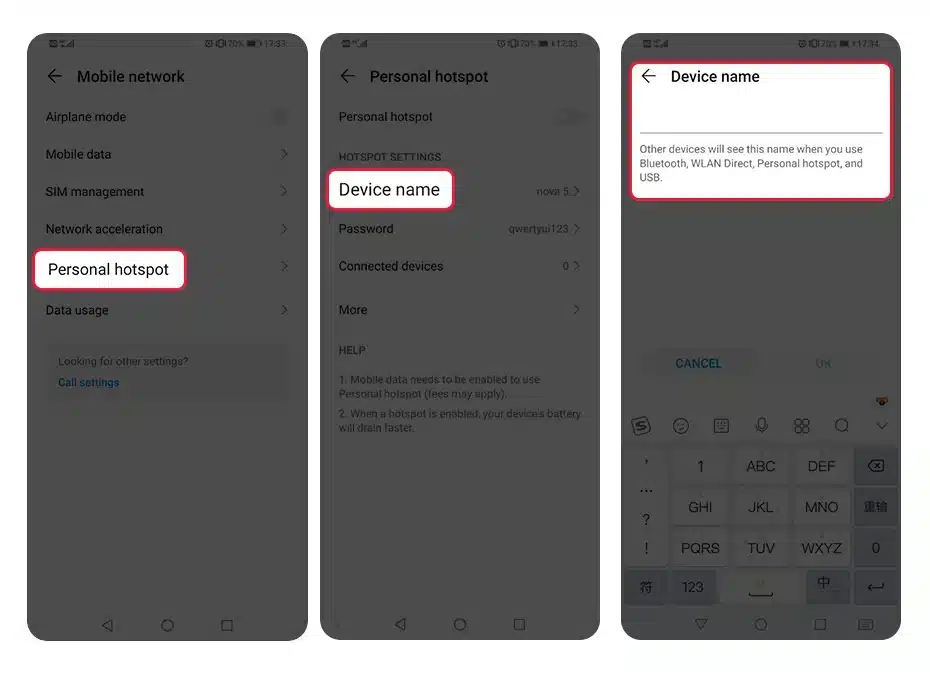
- Open the phone hotspot settings Keep mobile data active and confirm the hotspot is visible.
- Set the hotspot name to the supplied code Enter the characters exactly with no extra spaces before or after the code.
- Use 2.4 GHz when necessary Some Android head units cannot detect a 5 GHz-only hotspot.
- Connect the Android head unit Select the renamed hotspot and enter the hotspot password normally.
- Keep the connection active Do not change the SSID or disconnect until Toppal Voice confirms activation.
- Restart and test Restart if required, then test the wake method, microphone and supported commands.
When to Use Manual Code Entry Instead
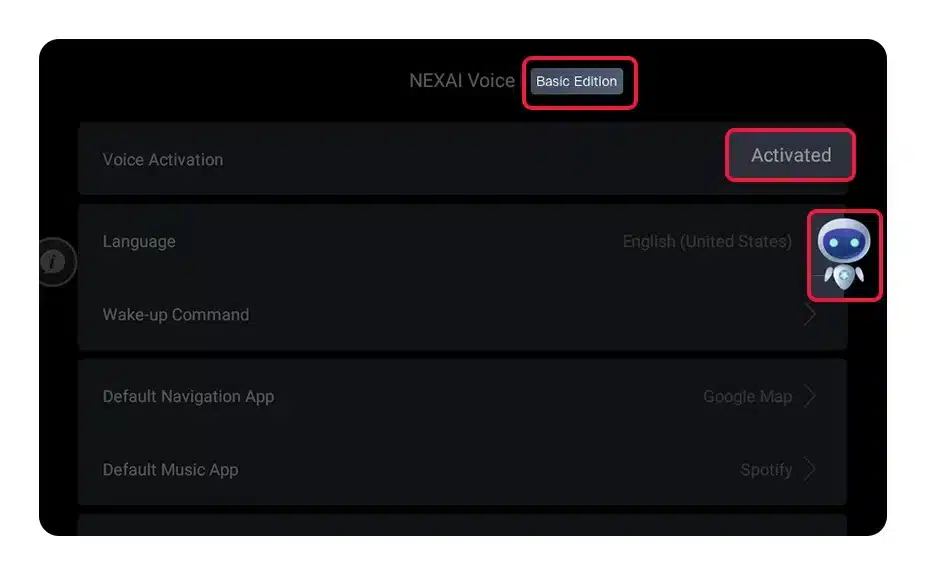
Use manual code entry only when the installed Toppal app provides an activation field or the supplied instructions specifically require direct code input.
- Open the activation page Do not enter the code into an unrelated settings screen.
- Confirm Standard or Pro The code and installed app version must match.
- Enter the code exactly Check 0 and O, 1 and I, capital letters and extra spaces.
- Keep the unit online Wait for validation before closing the app or restarting the system.
- Confirm the activation state Look for the app’s active status, removal of the activation request or successful command response.
Check Standard or Pro Before Buying a Code
Toppal Voice Standard activation
Buy a Standard code only when the installed app or supplied device information confirms the Standard package.
Toppal Voice Pro activation
Buy a Pro code only when the installed Pro package and required Pro functions have been confirmed.
Do not purchase Pro only because it sounds more advanced. The installed app, package and activation route must match.
How to Confirm Toppal Voice Activation Was Successful
Activation request disappears
The app no longer asks for a code or shows an active status.
Status remains after restart
Restart the head unit and confirm activation is still present.
Supported commands respond
Test wake-up, microphone, navigation, music or calling where supported.
Why Toppal Voice Hotspot Activation Fails
SSID does not match
The hotspot name contains a typo, space, hidden character or automatic phone suffix.
Wrong activation version
The code is Standard while the installed app is Pro, or the reverse.
Wrong frequency
The head unit cannot see a 5 GHz-only hotspot and needs 2.4 GHz.
No working internet
The head unit connects to Wi-Fi but the phone hotspot has no usable mobile data.
Incorrect system time
The Android head unit date, time or time zone prevents online validation.
App or package mismatch
The installed app version, firmware or package structure does not match the supplied activation route.
When an App Package Review Is Required
Stop activation and request review when Toppal Voice is missing, does not open, disappeared after a factory reset or does not show any supported activation route.
Send these device details
- Android version
- MCU version
- System build number
- App list or Toppal screen
- Factory-reset or firmware-update history
Why review is necessary
Package availability depends on the motherboard, firmware, software signature and required background or language components. Not every Android head unit can install the same package.
Bulk Toppal Voice Activation Codes for Installers and Dealers
FixMyDash supports Android head unit installers, car stereo dealers, repair shops, resellers and multiple-device customers who need several Standard or Pro activation codes.
Bulk requests are reviewed separately because app version, platform, language and activation route can differ between units.
How FixMyDash Reviews Toppal Voice Activation Cases
This guide is based on the activation routes, screenshots and compatibility questions handled through FixMyDash support. It separates activation-code purchase, app-package review and troubleshooting because they solve different technical problems.
Guide Review and Revision Record
Frequently Asked Questions
Does every Toppal Voice version use hotspot activation?
No. Some versions use hotspot-name activation, some use manual code entry and others use version-specific instructions.
What should I set as the phone hotspot name?
Set the hotspot name exactly to the supplied activation code only when your instructions require hotspot-name activation.
Why can my Android head unit not see the hotspot?
Try 2.4 GHz, keep the hotspot visible, remove unusual characters and confirm that the phone is not automatically changing the network name.
Can I enter a Pro code into a Standard app?
Do not assume the versions are interchangeable. The activation code must match the installed Standard or Pro package.
Can hotspot activation install Toppal Voice?
No. Hotspot activation authorizes a compatible app that is already installed. It cannot install missing software.
What information should I send if activation fails?
Send the order number, activation screen, Android version, MCU, build number, selected Standard or Pro option and a photo of the error.
Can installers request multiple activation codes?
Yes. FixMyDash accepts bulk requests from installers, dealers, repair shops, resellers and multiple-device customers.
Use the Correct Toppal Voice Activation Method
Buy the matching activation code when the app is already installed, request an app-package review when the software is missing, or contact FixMyDash when hotspot or manual activation fails.