Toppal Voice compatibility cannot be confirmed by vehicle model, Android version or RAM alone. FixMyDash checks the Android head unit motherboard, MCU version, system build, firmware, installed Toppal app status and available package before recommending an activation code or app-package review.
FixMyDash compatibility service: compatibility review, Toppal Voice activation options, app-package confirmation and guided troubleshooting for supported Android head units. We do not provide a universal compatibility guarantee or a single APK for every device.
Choose the Correct Toppal Voice Compatibility Route
Check version and buy activation
Choose this route when Toppal Voice opens normally and asks for Standard or Pro activation.
Buy Toppal Voice Activation CodeRequest app-package review
Choose this route when the app disappeared after a reset, was deleted or was never installed.
Request App Package ReviewSubmit system information
Choose this route when the motherboard, MCU, firmware or installed Toppal package is unclear.
Send System InformationWhat FixMyDash Checks for Toppal Voice Compatibility
Motherboard platform
The platform helps determine whether the required Toppal software environment and package structure may be available.
MCU version
The MCU string helps identify the head unit family, firmware environment and integration route.
System build number
The build number helps distinguish firmware revisions that may behave differently even on similar hardware.
Installed Toppal app
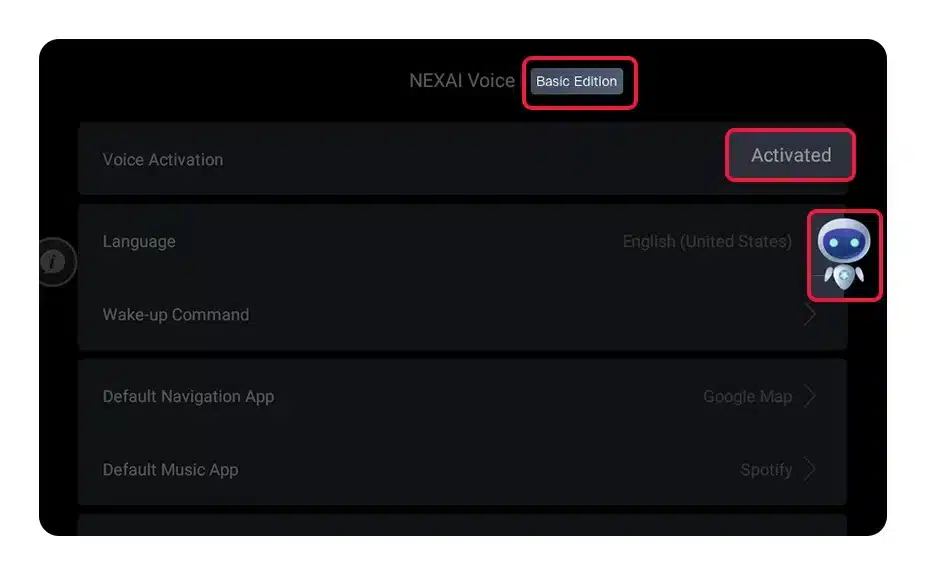
If Toppal Voice is already present, FixMyDash checks whether it opens, requests activation and shows Standard or Pro.
Background components
Some versions may rely on related background components or language resources. The exact structure varies by package.
Package availability
Hardware similarity does not guarantee that a matching Toppal package is currently available for the device.
What Does Not Confirm Toppal Voice Compatibility by Itself
Platform names are only clues
Labels such as TS10, FYT, NWD or Topway can help narrow the review, but the platform name alone is not a compatibility guarantee.
Device appearance is not proof
Similar dashboards, menus or product photos can hide different internal boards and firmware builds.
An incompatible package may fail to install, open without working voice control, conflict with system components or make recovery more difficult.
App Installed vs App Missing: The Correct Purchase Path
Toppal Voice is already installed
- Open the app and confirm it runs normally.
- Check whether it displays an activation request.
- Identify Standard or Pro.
- Confirm the required language.
- Test network and microphone access.
Toppal Voice is missing
- Prepare the Android version, MCU and build number.
- Provide system and app-list screenshots.
- Explain whether a factory reset or firmware update occurred.
- Do not buy activation before package review.
- Do not install a package from another head unit.
Toppal Voice Standard and Pro Compatibility
Standard and Pro activation options must match the installed Toppal package. A Pro activation code does not automatically convert a Standard app or add missing software components.
Standard compatibility
Choose Standard only when the installed app or confirmed package uses the Standard activation route.
Pro compatibility
Choose Pro only when the compatible Pro package and required Pro functions have been confirmed for the device.
Information Required for a Toppal Voice Compatibility Check
- Open the system information page Capture the Android version, MCU version and complete build number.
- Capture the Toppal app status Show the activation screen, error message or current app list.
- Explain recent changes State whether the unit was reset, updated, reflashed or had the original app removed.
- State the required option Provide Standard or Pro preference, required language and quantity.
Compatibility and Activation Method Are Separate Checks
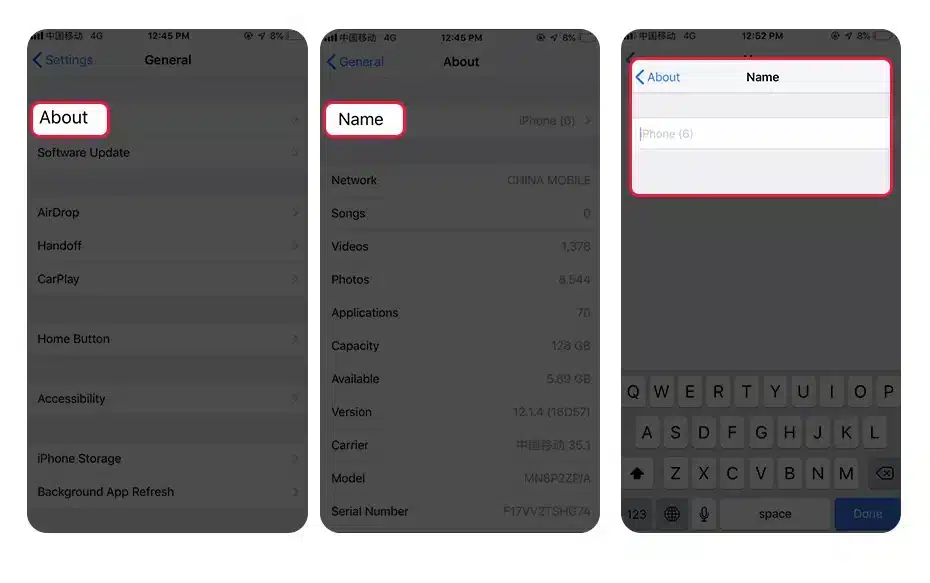
A compatible device may still use a different activation method from another supported head unit. Some Toppal versions use hotspot-name activation, some use manual code entry and others use version-specific instructions.
Hotspot-name activation
Used by some packages when the phone hotspot name is set to the supplied activation code.
Manual code entry
Used by some versions that provide an activation field inside the app.
Version-specific instructions
Used when the installed package follows a different workflow supplied with the order.
How FixMyDash Handles Compatibility Reviews
FixMyDash separates compatibility review, activation-code purchase, app-package review and troubleshooting because they solve different problems. This reduces the risk of purchasing the wrong service or installing software that does not match the Android head unit.
Evidence before recommendation
Recommendations are based on device screenshots, system information, installed app status and reported changes.
Clear service boundaries
Activation codes are for compatible apps that are already installed. App-package requests are reviewed separately.
No universal guarantee
FixMyDash does not claim that every Android head unit, vehicle model or Android version supports Toppal Voice.
Bulk Toppal Voice Compatibility Review for Installers and Dealers
FixMyDash supports Android head unit installers, car stereo dealers, repair shops, resellers and multiple-device customers who need compatibility review and activation planning for several units.
Frequently Asked Questions
Is my Android head unit compatible with Toppal Voice?
Compatibility must be checked from the motherboard, MCU, firmware, build number, installed app status and available Toppal package. Vehicle model or Android version alone is not enough.
Does Android 9 or later guarantee compatibility?
No. Android version is only one piece of system information. Two units with the same Android version may use different motherboards and firmware.
Does third-party APK installation mean Toppal Voice will work?
No. APK installation permission does not confirm that the package matches the motherboard, system signature, required background components or activation method.
Can I buy an activation code if Toppal Voice is missing?
Do not buy the code first. An activation code cannot install a missing app. Request an app-package compatibility review.
Are all TS10, FYT, NWD or Topway units compatible?
No. Platform labels are useful clues, but firmware, build, package structure and software availability can still differ between units.
Can one code be reused on multiple compatible devices?
Each supported device normally requires its own activation code. Installers and dealers can request bulk review and pricing.
Does Toppal Voice work offline?
Internet is generally required for voice recognition and connected services. Any local or offline functions depend on the installed Toppal package and firmware integration.
Is the activation license always lifetime and transferable?
License duration and transferability depend on the specific activation terms supplied with the order. Do not assume every code is transferable or lifetime.
Check Compatibility Before You Buy or Install
Buy an activation code when the compatible app is already installed, request an app-package review when the software is missing, or send the system information to FixMyDash when the platform is uncertain.