Car Screen Flicker: 4 Root Causes & Real Fixes — by FixMyDash®

Safety first: Park the vehicle, power off accessories, and never troubleshoot while driving. Disconnect the negative terminal before reseating display connectors.
Why it matters now
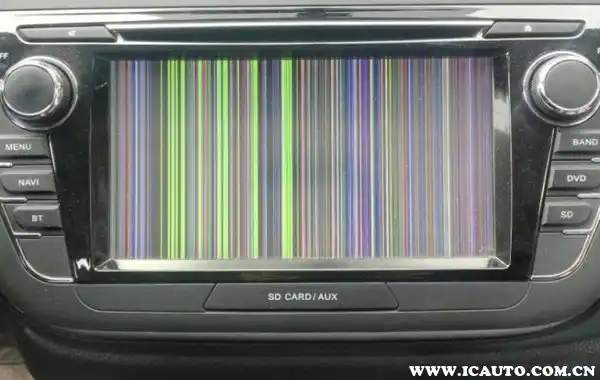
Car screen flicker hits at the worst time: you’re merging, the infotainment screen flicker starts, the map jitters, then the backup camera black screen lingers when you shift into reverse. This isn’t cosmetic—it’s about visibility and safety.
2025 campaigns from Ford, GM, Audi, and Tesla put car display flickering on the safety map. Most cases trace back to power/ground instability, LVDS cable loose symptoms, vibration stress, or a mismatched car display firmware update.
Helpful reads: TS18 unbrick · Touchscreen replace/clean · Activate Dofun Voice · Voice control use cases
Put yourself in the driver’s seat
You’re on a night highway. Brightness at 20% to keep the cabin calm. A mile before your exit, faint bands sweep across the map—then the route tiles stutter. That’s classic android head unit flicker behavior at low brightness. You tap for settings and the shimmer worsens over bumps. Next morning, in daylight, it’s nearly gone. The pattern matters—and it points the diagnosis in the right direction.
What is “car screen flicker” exactly?
It’s recurrent brightness pulsing, banding, tearing, or brief blackouts on your center display. In practice, drivers report four families of symptoms: unstable voltage (power/ground), LVDS cable loose symptoms, vibration/thermal stress, or software/firmware mismatch. The fixes below are ordered to minimize cost and rework.
1) Power stability (battery / alternator / ground)
- Engine-off ≥ 12.4 V; idle 13.7–14.7 V; crank not sustained < 10 V; ripple ≲ 0.1–0.3 V AC.
- Clean/tighten battery posts and chassis grounds; use a dedicated fused feed for aftermarket units.
- Fix weak batteries or charging faults before chasing parts—the wrong fix can mask the car screen flicker causes for days.
Prefer a done-for-you check? Power & ground inspection by FixMyDash.
2) Display cables & connectors (LVDS/FPC)
- Power down → reseat LVDS/FPC & main harness until locks click; replace oxidized or loose cables.
- Add strain relief and foam; route away from high-EMI paths and avoid tight bends.
How-to: Replace & clean your touchscreen (reduces recurring car screen flicker after road vibrations).
3) Vibration & thermal stress
- Tighten mounts; add damping pads at hard contacts; rough-road car display flickering points to harness or mount issues.
- Cold-start flicker that fades warm often indicates temperature-sensitive joints—seek professional rework.
Board-level diagnostics: mail-in repair.
4) Software / firmware mismatch
- Backup → factory reset → test with minimal apps; disable floating overlays/recorders/filters.
- Apply a model-matched car display firmware update (resolution/refresh/theme). For fixed-PWM designs, test at 60–100% brightness.
Bricked after the wrong build? Start with TS18 unbrick & recovery, then re-flash correctly. If the car screen flicker fix still fails, escalate to hardware diagnosis.
Five-step diagnosis (save time & money)
- Meter off/on/idle/crank/load/ripple.
- Clean/tighten grounds & posts; add a dedicated ground if needed.
- Reseat/lock LVDS/FPC; relieve strain.
- Reset and update to proper firmware; test without overlays.
- A/B with known-good cables/screen; pro check for backlight/PCB.
If you smell burning, feel unusual heat, or hear coil whine with brightness surges, disconnect power immediately.
Fast triage table
| What you see | Likely cause | First move |
|---|---|---|
| Car screen goes black after shifting to R | APIM/video path fault | Check recalls; update before parts |
| Infotainment screen flicker at start or with A/C | Voltage sag / poor grounds | Meter off/on/idle/crank; clean posts & grounds |
| Car display flickering worse on rough roads | LVDS/FPC or harness strain | Power off → reseat to lock; add strain relief |
| Low-brightness banding | PWM dimming / aging backlight | Test 60–100% brightness; consider firmware/backlight driver |
| Only one app flickers | Overlay/render conflict | Disable overlays; factory reset; minimal apps |
Recall headlines, 2025
Before replacing any display or APIM, check your VIN and apply software actions first—many car screen flicker causes are software-addressable.
US: NHTSA VIN Lookup · UK: GOV.UK Recall Check · EU: Safety Gate Alerts
Recall tracker: Display / Camera / Cluster (updated Aug 22, 2025)
| Campaign | Date | Models / Years | Symptom | Remedy |
|---|---|---|---|---|
| NHTSA 25V516 (related to 24V802) | 2025-08-01 | Instrument panel cluster remedy validation | Telltales may not illuminate | Verify & reapply correct software remedy |
| Ford 25S49 / NHTSA 25V315 | 2025-05 | 2021–2025 Ford/Lincoln | Backup camera freeze/delay/blank | APIM/infotainment software update |
| Campaign | Date | Models / Years | Symptom | Remedy |
|---|---|---|---|---|
| NHTSA 25V356 (GM N25250068) | 2025-05-29 | Cadillac Lyriq 2023–2024 | Driver display may go blank | Update display control module software |
| Campaign | Date | Models / Years | Symptom | Remedy |
|---|---|---|---|---|
| NHTSA 25V201 / Code 90VC | 2025-04 | A6/A7/A8/Q7/Q8 incl. S/RS (2021) | Instrument panel may shut down | Dealer software update |
| Campaign | Date | Models / Years | Symptom | Remedy |
|---|---|---|---|---|
| NHTSA 25V002 | 2025-01 | Model 3/S (2024–2025), X/Y (2023–2025) | No rearview image | OTA; replace computers if needed |
| Cybertruck (separate) | 2024–2025 | 2024–2025 Cybertruck | Rear camera image delay | OTA to meet 2s rule |